|
That's why we developed SplineTech JavaScript Debugger. |
|
SplineTech JavaScript Debugger Features
- Fastest Independent standalone full-featured JavaScript Debugger, JScript Debugger and AJAX Debugger for HTML, DHTML and AJAX
- Native JavaScript, Native JScript and Native VBScript Fully Supported
- 100% standalone JavaScript Debugger - No add-ons required
- 100% independent JavaScript Debugger - No additional / third-party software required
- No web-based debugging interfaces or pop-up windows
- No Java/JVM/JRE required
- No attaching to process needed
- Fully Supports Native Browser-Side JavaScript, Native JScript and Native VBScript
- Does not emulate JavaScript, JScript or VBScript
- This means no portability issues -
if your code works under SplineTech JavaScript Debugger it will work outside SplineTech JavaScript Debugger
- Debug any JavaScript, including dynamically generated JavaScript in remote files
- Just type any URL (http:// or http://) pointing to any remote or local JavaScript file, and click Go
- Debug AJAX/JavaScript/HTML/DHTML pages dynamically generated by PHP, ASP, JSP etc
- Easily debug any remote file - no need to have the file physically on your machine. Remote AJAX, JavaScript, HTML and DHTML files are fully supported
- Feature available exclusively on SplineTech JavaScript Debugger
- Debug any sequence of HTML and DHTML pages simply by following links, submitting forms or even typing in a new URL
- Debug unlimited number of HTML pages (JavaScript pop-ups etc.) at the same time
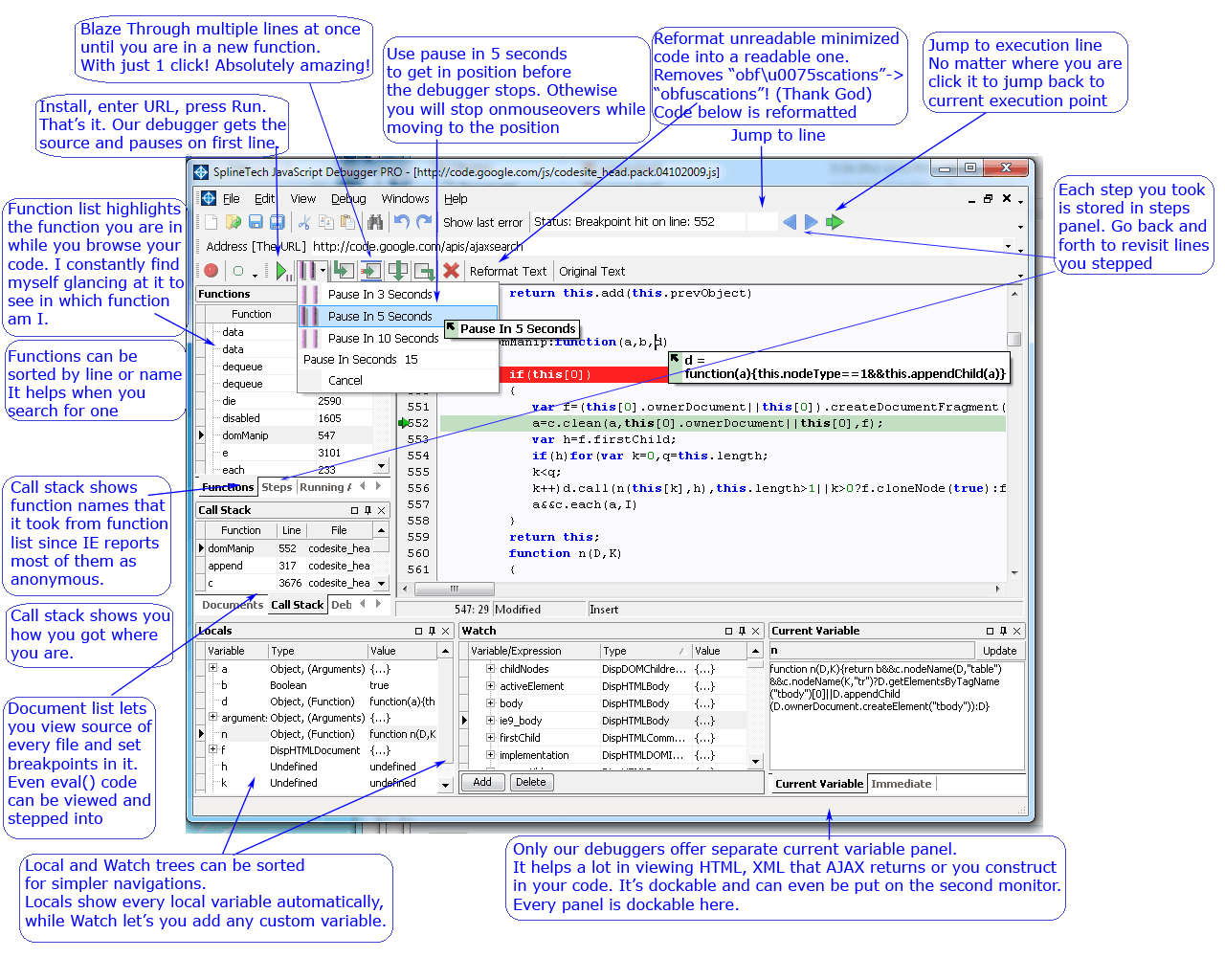
Pause in 3, 5, 10 seconds (PRO Edition Only)
- Now you can easily skip all mouseover/mouseout etc. and pause precisely on the event that you are debugging
- Very useful for debugging complex AJAX controls
- Feature available exclusively on SplineTech JavaScript Debugger
- See all functions in your code
- Instantly jump to any function from the list by clicking on its name
- Integrated movable dockable Function List window
- Highlights the beginning of the clicked function in the code
- Call Stack Panel (PRO Edition Only)
- See a list of all function calls, from the first up to the current one, with all line numbers, function names and file names, in a convenient movable dockable Call Stack Panel
- Jump to any function indicated in this list by double clicking it.
- Now you can easily debug AJAX controls even with unformatted source code
- Feature available exclusively on SplineTech JavaScript Debugger
- Replaces obfuscating characters in strings. For example: ie = "Mi\143rosof\164\040I\u006e\164\u0065\162ne\u0074\u0020Ex\u0070lorer" becomes a readable string ie = "Microsoft Internet Explorer"
- Monitor Local Variables and their properties in a convenient tree structure
- All Local variables appear automatically in a convenient tree structure
- No need to manually add your Local Variables to watch - they are added automatically
- Watch all your Local Variables in a new Locals Panel (movable dockable internal window)
- Easily change values of your Locals right in the Locals Panel - at any time
- Check all properties of your Locals as they are updated automatically
- Watch Expressions and Variables in a convenient tree structure and change their values as you go
- Watch all your Variables and Expressions in a new separate Watch Panel
- Add/Delete variables on the go
- Change variable values with one click
- Add any Custom Expression and monitor all its properties in a convenient tree structure
- Immediate Window support (PRO Edition Only)
- Simply type in a variable (or expression) in a separate Immediate Window Panel, click enter and instantly see the value of that variable (or expression) right on the next line
- Change any variable value and any expression value in that same Immediate Window panel
- Dedicated Debug.WriteLine window panel (PRO Edition Only)
- Trace your code using Debug.WriteLine
- Debug files included with <SCRIPT SRC=....> tag
- Unlimited number of <SCRIPT SRC=....> tags supported
- Just set a breakpoint in that included file and when it will be hit the debugger will include it in debugging process.
- Advanced Form Debugging
- Perfect for Form Validation - Validate order forms in client's browser window before they are submitted
- Pop-Up Debugging
- Debug JavaScript Pop-Up windows
- Full featured HTML Debugger and Editor
- Debug HTML/DHTML files stored locally and stored on your server
- Debug HTML/DHTML pages dynamically generated by PHP, ASP, JSP etc.
- Debug DHTML Behavior
- Debug any JavaScript Menu and DHTML Menu
- Debug JavaScript and VBScript events
- Debug onclick, onmouseover, onfocus and any other event
- Debug window.onload
- Pause execution with Cause Break feature
- Full featured HTC Debugger and Editor
- Debug Browser-Side Controls
- Debug Calendars, and any other control
- Debugger keyword now fully supported
- Monitor values of any variable in a separate panel
- Priceless for AJAX developers to evaluate long strings with XML or HTML
- Debug JavaScript in AJAX applications
- AJAX applications fully supported
- Multi-Functional Browser-Side VBScript and JavaScript Script Editor (for HTML ad DHTML), featuring:
- User-friendly Intuitive Contemporary Interface
- Color-coded syntax. This feature can save countless hours, since it helps you quickly spot obvious errors such as missing quotation marks.
- Full Support for native VBScript and JavaScript syntax
- Recent Documents List
- Open Files List (on-screen)
- Line Numbering
- Line/Column Position indication
- Execution Line Highlighting. See the current line of the code to be executed.
- Open multiple files at once
- Multiple fonts support
- Columnar blocks
- Unlimited multilevel undo/redo
- Unlimited file size and line size
- Customizable movable and dockable user interface
- Unlimited Bookmarks - set bookmarks anywhere you wish throughout your code
- Complete Documents List
- List of all included files
- Unlimited included files supported
- Integrated Step by Step Debugging Assistant
- Instantly check what's your next step - how to set a breakpoint etc.
- Direct to point, easy to follow hints
- Hints appear in the upper-left corner of the main window
- Movable and dockable Hints Panel
- Very user-friendly explicit JavaScript Bug Reporting
- Run-Time Error Handling
- Runtime errors usually are illogical or incorrect reasoning in your script. I.e. a very common error in JavaScript is mismatched data types — something like trying to perform a mathematical calculation on a data string
- Set | Clear Breakpoints
- Step in | Step out | Step over
- Debug | Go
- Show Last Error
- See the exact position where the latest error occurred and the description of that error message - right over your code
- Variable Watch
- Enter variables and monitor their values - live
- Variable Hint - see the value of your variable by moving the mouse over it
- Expression Evaluation and Watch
- Monitor complete expressions and watch their values, i.e. 'x+10'
- Expression Evaluation Hint - see the value of your expression by moving the mouse over it, as you go!
- Client-side Script Debugging of
- native VBScript code and
- native JavaScript code (including MS JScript)
- No manual configuration
- No network configuration needed
- Step-by-Step Multimedia Tutorials and Functional Demonstration
- every JavaScript debugging issue covered
- updated regularly
- User-friendly feature-rich award-winning JavaScript Debugger and Editor
- User-friendly environment - made and improved with JavaScript Developers like you in mind
- Intuitive interface - ready to debug right away, virtually no learning required
- Feature-rich - packed with all the features that any serious JavaScript Developer must have
- Completely customizable and adjustable elements of user interface
 I've had a day or two now to play around with the SplineTech
JavaScript Debugger and I'm impressed with it. Just enter a URL and it will open the file
(and included JavaScript files as you step into them) in the debugger and load
it into IE. You can step thru the code, set breakpoints and watchpoints, and
hover over a variable name to see its value. ...the best
thing I've found. The price is very reasonable too... E-mail support is
excellent...
I've had a day or two now to play around with the SplineTech
JavaScript Debugger and I'm impressed with it. Just enter a URL and it will open the file
(and included JavaScript files as you step into them) in the debugger and load
it into IE. You can step thru the code, set breakpoints and watchpoints, and
hover over a variable name to see its value. ...the best
thing I've found. The price is very reasonable too... E-mail support is
excellent...
Tracy Dryden, Independent IT Consultant (USA)

|
|
SplineTech JavaScript Debugger. It Works.

Copyright © 1999-2026 Spline Technologies Corporation. Make your development life easier.